
A good AI video prompt does more than describe what a scene looks like. It also explains what happens, how the subject moves, how the camera behaves, and what kind of visual atmosphere the video should create.
This AI video prompt guide focuses on how to write clearer and more useful prompts for video generation on Seedance.com.ai. You will learn a simple prompt structure, how to describe movement and camera direction, how text-to-video and image-to-video prompts differ, and how to improve prompts when the first result does not match your idea.
What Makes a Good AI Video Prompt?
An effective AI video prompt gives the model a clear creative direction without filling the description with unnecessary details.
For most video ideas, it helps to think about five main elements:
Subject + Action + Scene + Camera Movement + Visual Style
You do not need to include every element in every prompt. The goal is to describe the parts that actually matter to the video you want to generate.
A Simple AI Video Prompt Formula
1. Subject
Start by identifying the main focus of the video. This could be a person, animal, product, vehicle, landscape, or another visual subject.
A woman standing beside the ocean
2. Action
Next, explain what the subject is doing. Video prompts need movement, so this part is often more important than adding extra visual adjectives.
A woman slowly turns toward the ocean while her hair moves in the wind
3. Scene
Add the environment when it helps establish the setting or mood. Useful details can include location, weather, lighting, time of day, or surrounding objects.
A woman slowly turns toward the ocean at sunset while gentle waves move across the shore
4. Camera Movement
If the camera should move in a specific way, describe that direction clearly. Camera instructions can change how the same scene feels.For more control over motion and camera behavior, see our Seedance reference video tutorial.
The camera slowly pulls back to reveal more of the coastline
5. Visual Style
Finally, add visual direction when it is important to your idea. Keep it focused rather than stacking many unrelated styles together.
Soft sunset lighting, realistic details, calm cinematic atmosphere
Complete AI Video Prompt Example
Once the main elements are combined, the prompt becomes much more useful:
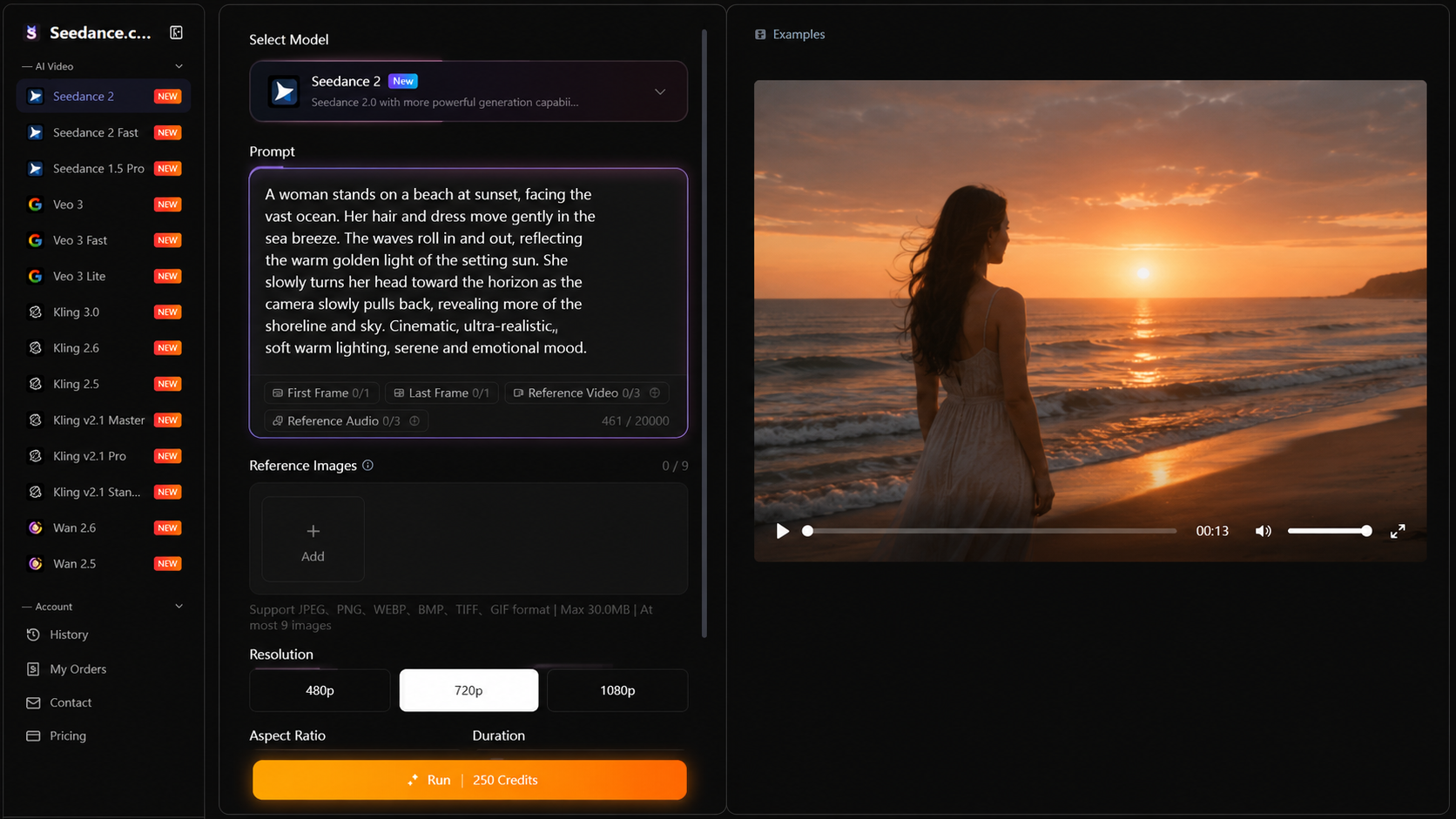
A woman stands beside the ocean at sunset and slowly turns toward the water while her hair moves gently in the sea breeze. Small waves roll across the shore as the camera gradually pulls back to reveal the coastline. Soft golden lighting and a calm cinematic atmosphere.
This prompt establishes the subject, movement, environment, camera direction, and visual mood without making the description unnecessarily complicated.
If you want to apply this prompt structure with a Kling model, read our Kling AI Tutorial for the complete workflow on Seedance.com.ai.
How to Write Text-to-Video Prompts
With text-to-video prompts, the written description provides most of the creative direction. Because there is no starting image defining the scene, your prompt should describe both what the scene contains and what happens during the video.
A useful text-to-video structure is:
Subject + Main Action + Environment + Camera Direction + Lighting or Style
Example: Cinematic Landscape
A lone traveler walks slowly across a wide desert at sunrise. Wind moves across the sand while distant mountains appear through the morning haze. The camera follows from behind before slowly rising to reveal the landscape. Warm cinematic lighting.
Example: Urban Scene
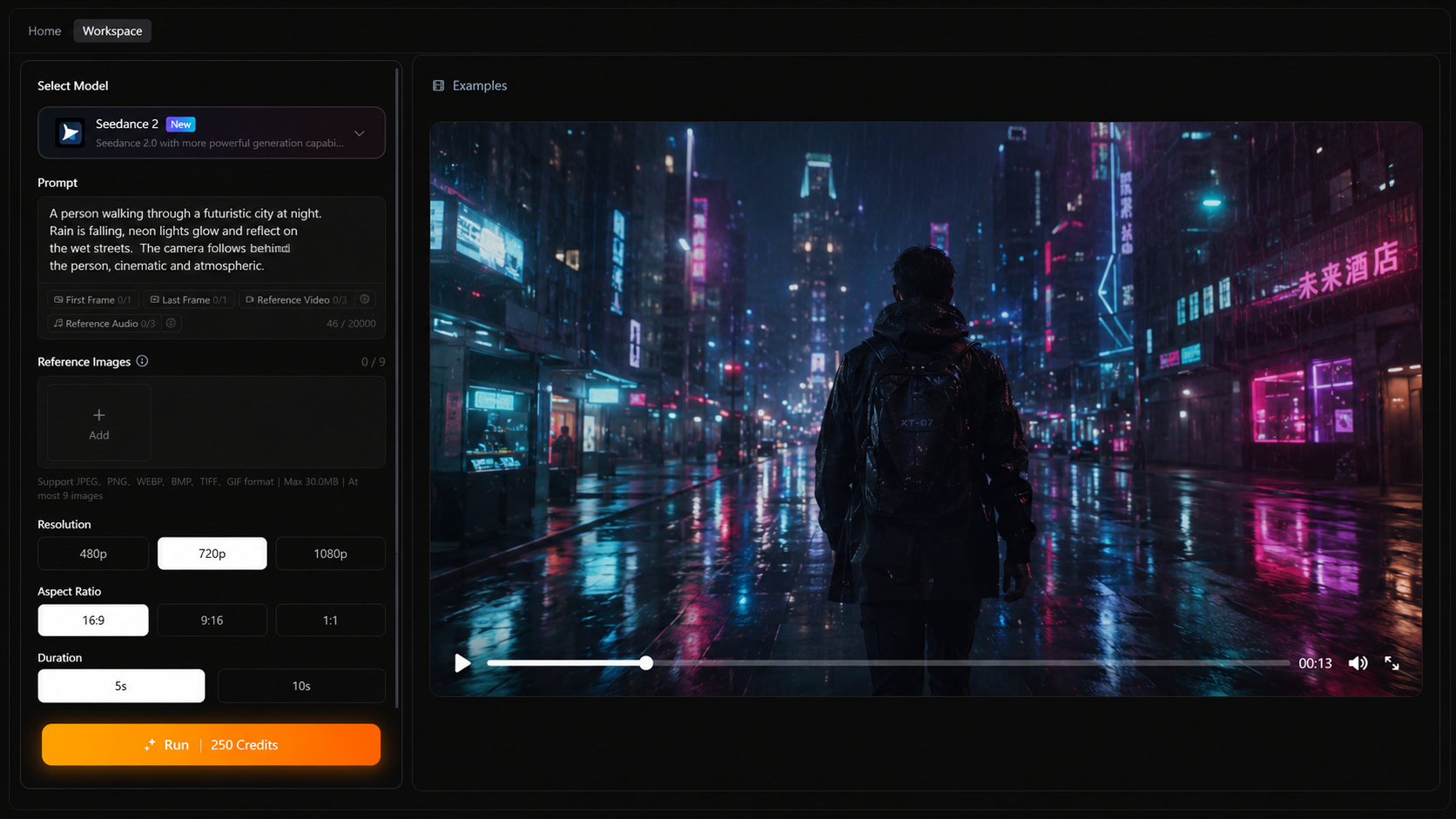
A person walks through a rainy city street at night as reflections move across the wet pavement. Cars pass slowly in the background while the camera tracks alongside the subject. Atmospheric neon lighting and realistic cinematic details.
For the complete generation workflow, see the Seedance Text-to-Video Tutorial.
How to Write Image-to-Video Prompts
Image-to-video prompts should be approached differently. When you already have a reference image, you usually do not need to describe every visual detail that is already visible.
Instead, focus more heavily on movement:
Subject Movement + Environmental Movement + Camera Movement + Atmosphere
Example: Portrait Image
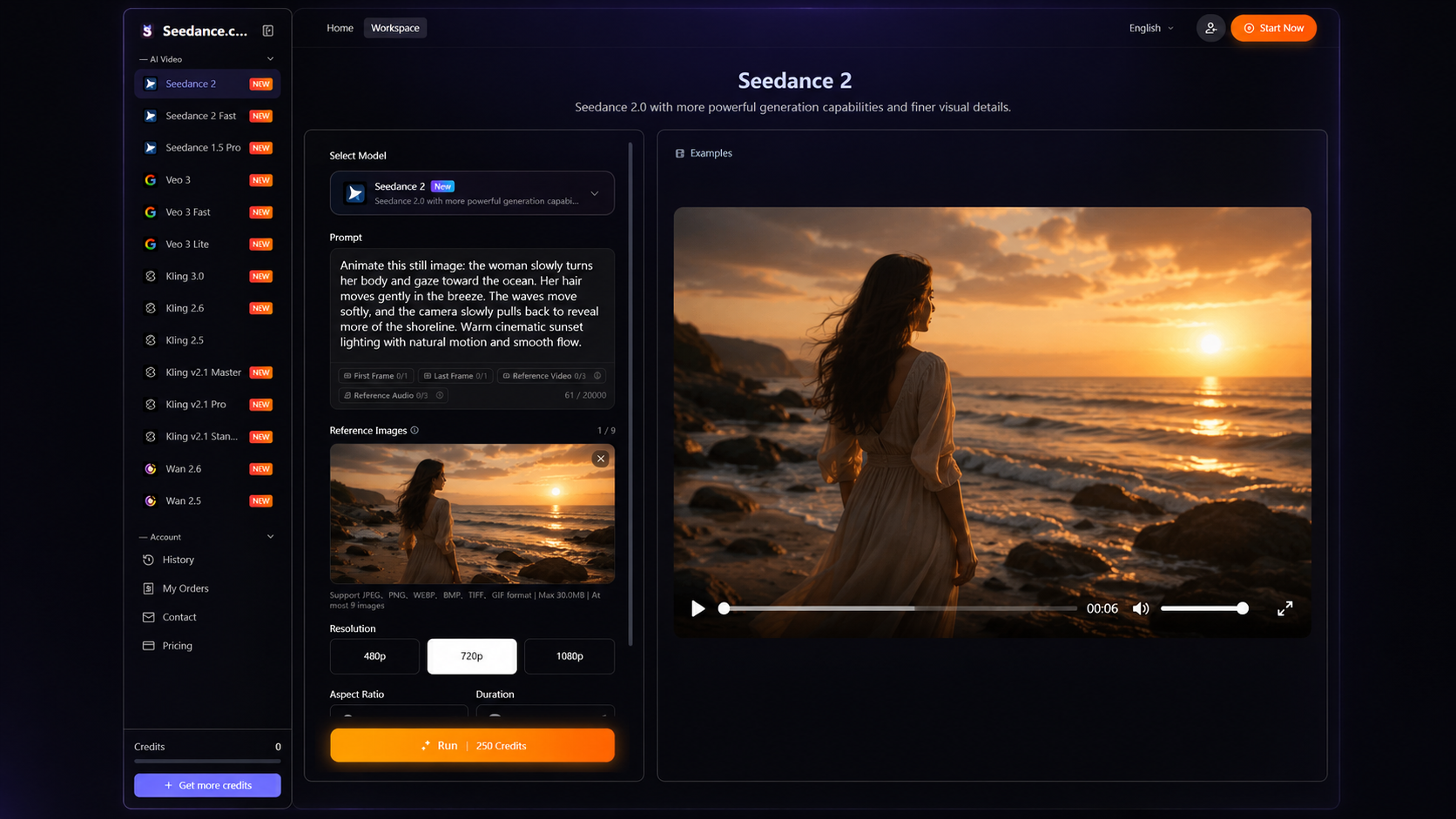
She slowly turns toward the camera while her hair moves naturally in the breeze. She blinks gently as the camera makes a subtle push-in. Soft natural movement and a calm cinematic atmosphere.
Example: Landscape Image
Mist drifts slowly through the valley while clouds move across the mountains. Trees sway gently in the wind as the camera slowly pans across the landscape.
The reference image provides the visual starting point, while the prompt explains how that image should develop into motion.
For a complete step-by-step workflow, read the Seedance Image-to-Video Tutorial.
How to Describe Motion More Clearly
One of the most important parts of an AI video prompt is the action. Avoid vague instructions such as “make it move” when you already know what type of movement you want.
Instead of:
Make the woman move naturally.
Try:
The woman slowly turns her head toward the ocean while her hair moves gently in the wind.
Instead of:
Animate the landscape.
Try:
Clouds drift slowly across the sky while grass and tree branches move gently in the breeze.
Specific movement gives the prompt a clearer direction.
How to Describe Camera Movement
Camera direction can help establish the rhythm and composition of an AI-generated video. You do not need complex filmmaking terminology for every prompt. Simple, clear instructions are often enough.
Push in: The camera slowly moves closer to the subject.
Pull back: The camera gradually moves away to reveal more of the scene.
Pan: The camera moves horizontally across the environment.
Tracking shot: The camera follows the subject as it moves.
Static camera: The camera stays fixed while movement happens within the scene.
Only include camera movement when it supports the result you want. Adding unnecessary camera instructions can make a simple scene more complicated than it needs to be.
Common AI Video Prompt Mistakes
Using Prompts That Are Too Vague
A prompt such as “a beautiful cinematic city” describes an appearance but says very little about what should happen during the video.
Add a clear action or environmental change so the model has a stronger motion direction.
Adding Too Many Unrelated Ideas
A single prompt does not need several characters, multiple locations, dramatic camera changes, different lighting conditions, and many unrelated actions at the same time.
Start with one main scene and one clear creative direction.
Repeating What Is Already Visible in a Reference Image
When using image references, spending most of the prompt describing the image again can waste valuable attention.
Focus more on what should change or move after the image becomes a video.
Ignoring Movement
Visual descriptions such as “beautiful,” “realistic,” or “cinematic” describe appearance, but they do not explain motion.
When movement matters, state it directly.
Using Too Many Style Words
Combining many different visual styles can make the intended direction less clear. Choose the few style characteristics that actually matter to the scene.
How to Improve a Prompt After Generation
The first prompt does not always need to produce the final result. Prompt refinement works best when you identify the specific part that needs improvement.
If the subject looks correct but barely moves, strengthen the action description.
If the movement works but the framing feels wrong, adjust the camera direction.
If the scene feels too busy, remove secondary actions or unnecessary visual details.
If the atmosphere is wrong, refine the lighting, environment, or visual style rather than rewriting the entire prompt.
Generate → Review the Result → Identify One Problem → Adjust the Relevant Prompt Detail → Generate Again
This approach makes it easier to understand which prompt changes are influencing the result.
AI Video Prompt Examples
Portrait Prompt
A woman looks toward the camera and slowly smiles while a light breeze moves her hair. The camera makes a subtle push-in. Soft natural lighting and realistic cinematic motion.
Nature Prompt
A quiet forest in the early morning as sunlight gradually passes through the trees. Leaves move gently in the wind while mist drifts between the trunks. The camera slowly moves forward along the forest path.
Product Prompt
A sleek product rests on a dark reflective surface while soft light moves gradually across its edges. The camera slowly circles around the product to reveal its shape and details. Clean premium studio atmosphere.
City Prompt
A pedestrian walks through a futuristic city street at night while light rain falls around them. Reflections move across the pavement as the camera follows from behind. Atmospheric urban lighting and cinematic depth.
A Simple Prompt Checklist
Before generating your video, quickly check your prompt:
Is the main subject clear?
Does the prompt explain what should move?
Is the environment described only when necessary?
Is the camera direction clear if camera movement matters?
Are the visual style and lighting instructions focused?
Have you removed unnecessary or conflicting details?
If you can answer these questions clearly, your prompt is usually ready to test.
AI Video Prompt FAQ
How long should an AI video prompt be?
There is no single ideal length. A prompt should be long enough to communicate the important subject, action, environment, camera direction, and visual style, but not filled with details that do not affect the intended video.
Should I use very detailed prompts?
Use detail where it helps control the result. Specific action and camera instructions can be useful, while unnecessary adjectives or unrelated scene details can make the prompt less focused.
What is the most important part of an AI video prompt?
Movement is especially important for video. Clearly describing what the subject, environment, or camera should do can provide stronger direction than simply describing how the scene looks.
Are text-to-video and image-to-video prompts the same?
No. Text-to-video prompts generally need to establish both the visual scene and the movement. Image-to-video prompts can rely on the reference image for much of the visual information and focus more on motion and scene development.
Can I improve a prompt after seeing the generated result?
Yes. Review what worked and what did not, then change the part of the prompt related to that specific issue. Refining one major element at a time makes the process easier to evaluate.
Write Better AI Video Prompts on Seedance.com.ai
Better AI video prompts come from giving the model a clear direction rather than simply adding more words. Start with the subject and action, add the environment and camera movement when needed, and use visual style to support the scene rather than overwhelm it.
If you are new to the platform and want to understand the complete creation process before focusing on prompting, read the Seedance AI Tutorial.



