Seedance.com.ai is a multi-model AI video generation platform that brings different AI video model families into one workspace. Users can select a model, enter a prompt, add supported reference materials, adjust the generation options available for the selected model, and generate AI videos without moving between separate platforms.
The platform includes model families such as Seedance, Veo, Kling, and Wan, giving users multiple options for AI video creation within the same workflow. This guide explains what Seedance.com.ai is, how it works, which models are available, its key features, and its current pricing.
What Is Seedance.com.ai?
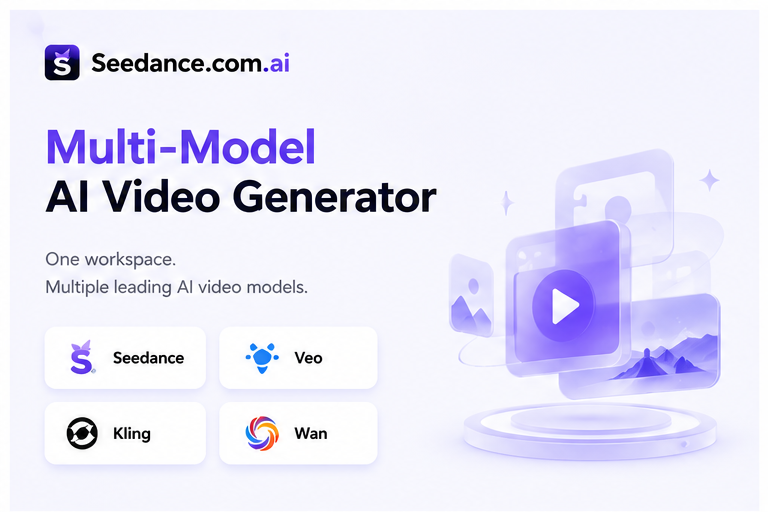
Seedance.com.ai is an online AI video creation platform built around a multi-model workflow.
Instead of limiting users to one AI video model family, the platform provides access to different models and versions within the same AI Video workspace. Users can choose the model they want to use and continue directly into the video generation process.
This makes Seedance.com.ai useful for creators who want to explore different AI video models without repeatedly switching between separate platforms.
If you want a step-by-step explanation of the creation process, you can also read the Seedance AI Tutorial.
How Does Seedance.com.ai Work?
The basic workflow on Seedance.com.ai is designed around selecting a model and preparing the inputs required for that model.
Select a Model → Enter a Prompt → Add Supported Reference Materials → Adjust Available Generation Settings → Generate and Preview the Video
Users first enter the AI Video workspace and select the model they want to use. They can then describe the intended video through a text prompt.
Depending on the selected model, additional reference materials and generation options may also be available. Because different AI models can support different input methods and settings, users should follow the options displayed in the workspace for the model they currently select.
If you want to improve the way you describe scenes, actions, camera movement, and visual direction, see our AI Video Prompt Guide.
Which AI Video Models Are Available on Seedance.com.ai?
As a multi-model AI video generator, Seedance.com.ai provides several AI video model families with different versions available within the platform.
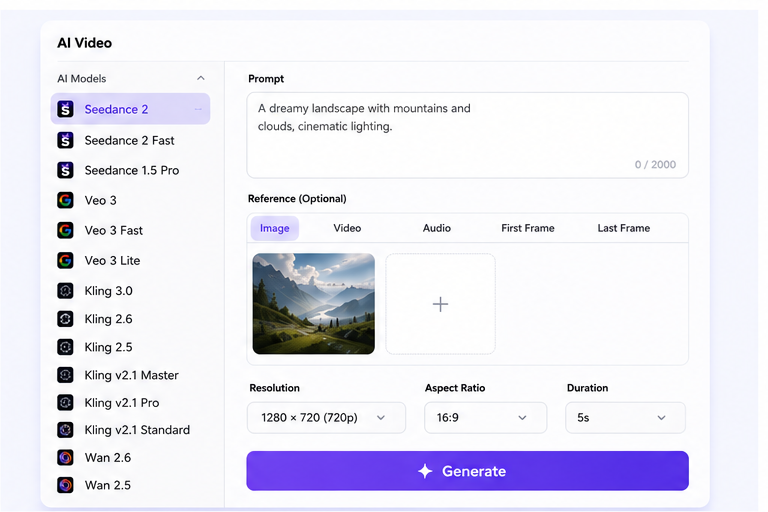
Seedance Models
Seedance 2
Seedance 2 Fast
Seedance 1.5 Pro
Veo Models
Veo 3
Veo 3 Fast
Veo 3 Lite
For a more detailed workflow, read How to Use Veo on Seedance.com.ai.
Kling Models
Kling 3.0
Kling 2.6
Kling 2.5
Kling v2.1 Master
Kling v2.1 Pro
Kling v2.1 Standard
You can learn more about the Kling workflow in our Kling AI Tutorial.
Wan Models
Wan 2.6
Wan 2.5
For Wan-specific instructions, see How to Use Wan on Seedance.com.ai.
Model availability and individual generation options may change as the Seedance.com.ai AI Video workspace is updated.
Key Features of Seedance.com.ai
Multiple AI Video Models
One of the main characteristics of Seedance.com.ai is its multi-model structure. Users can access different AI video model families and choose between available versions from the same platform.
This allows creators to explore different models without building a completely separate workflow for every AI video platform.
Prompt-Based Video Generation
Users can describe the video they want to create through a text prompt. A prompt can explain elements such as the main subject, action, scene, camera direction, and overall visual style.
Clear descriptions can make the intended creative direction easier for the selected AI model to understand.
Reference Material Support
Depending on the selected model, Seedance.com.ai can provide different reference input options. The exact material types and input limits depend on what is supported by the model currently selected in the workspace.
For example, when an image reference is supported, users can provide a static image and use the prompt to describe the motion or changes they want to generate. For a dedicated workflow, see How to Animate a Still Image with AI.
Video Generation Settings
The AI Video workspace provides generation options based on the selected model. Because these options can vary between models, users can review and adjust the settings currently displayed before starting the generation process.
Why Use a Multi-Model AI Video Generator?
Different AI video models can provide different input methods, model versions, and generation options. A multi-model AI video generator brings these choices into one platform instead of requiring users to move between separate websites.
On Seedance.com.ai, users can switch between available Seedance, Veo, Kling, and Wan models within the AI Video workspace.
This approach is particularly useful for creators who want to explore several AI video models while keeping the general creation process in one place.
Multiple model families: Access different AI video models from the same platform.
Multiple model versions: Choose between different versions within supported model families.
Centralized workflow: Select a model, prepare the required inputs, and generate from one AI Video workspace.
Flexible model selection: Change models according to the current video generation task.
Seedance.com.ai Pricing
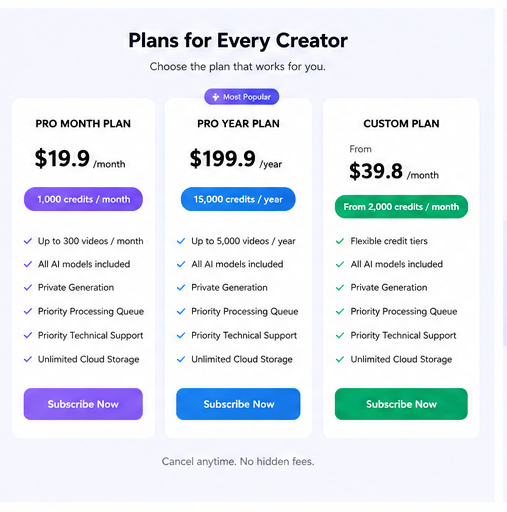
Seedance.com.ai currently provides monthly, yearly, and custom subscription options.
Pro Month Plan
$19.9/month with 1,000 credits per month and up to 300 videos per month.
Pro Year Plan
$199.9/year with 15,000 credits per year and up to 5,000 videos per year.
Custom Plan
The Custom Plan currently starts from $39.8/month for 2,000 credits per month, with additional credit tiers available.
Paid plans also list benefits such as Private Generation, Priority Processing Queue, Priority Technical Support, and Unlimited Cloud Storage.
Pricing, credits, available models, and plan details may change over time. Check the official Seedance.com.ai Pricing page for the latest information before subscribing.
Who Is Seedance.com.ai For?
Seedance.com.ai is suitable for users who want to create AI videos while exploring more than one AI video model.
Instead of relying on a single model family, creators can choose between different models according to the video they want to generate and the options available in the current workspace.
For users who are new to AI video generation, the centralized workspace also provides a consistent place to become familiar with the basic process of selecting a model, entering a prompt, adding supported references, adjusting available settings, and generating a result.
Frequently Asked Questions
What is Seedance.com.ai?
Seedance.com.ai is a multi-model AI video generation platform that provides multiple AI video model families within one AI Video workspace.
Which AI video models are available on Seedance.com.ai?
Seedance.com.ai currently provides models from the Seedance, Veo, Kling, and Wan families, with multiple versions available within these model families.
How does Seedance.com.ai work?
Users select an AI video model, enter a prompt, add reference materials when supported by the selected model, adjust the available generation settings, and then generate and preview the video.
Can I switch between different AI video models?
Yes. Seedance.com.ai provides multiple AI video models in the same AI Video workspace, allowing users to select different models and versions.
How much does Seedance.com.ai cost?
The current Pro Month Plan is $19.9 per month, the Pro Year Plan is $199.9 per year, and the Custom Plan starts from $39.8 per month. Pricing and plan details may change over time.
Conclusion
The main advantage of Seedance.com.ai is its multi-model approach. Seedance, Veo, Kling, Wan, and their available model versions can be accessed through one AI Video workspace instead of requiring a separate platform for every model.
For creators who want to explore different AI video models while keeping the generation process centralized, Seedance.com.ai provides a straightforward way to select a model, prepare the required inputs, adjust the available settings, and generate AI videos.



